Canned Reply
The Canned Reply feature in WhatsCloud helps you create and store prewritten responses for quick and easy communication. This feature*saves time, ensures consistency, and improves customer interactions by allowing customer support and sales teams to quickly reply to common queries or send predefined messages.
Features Overview
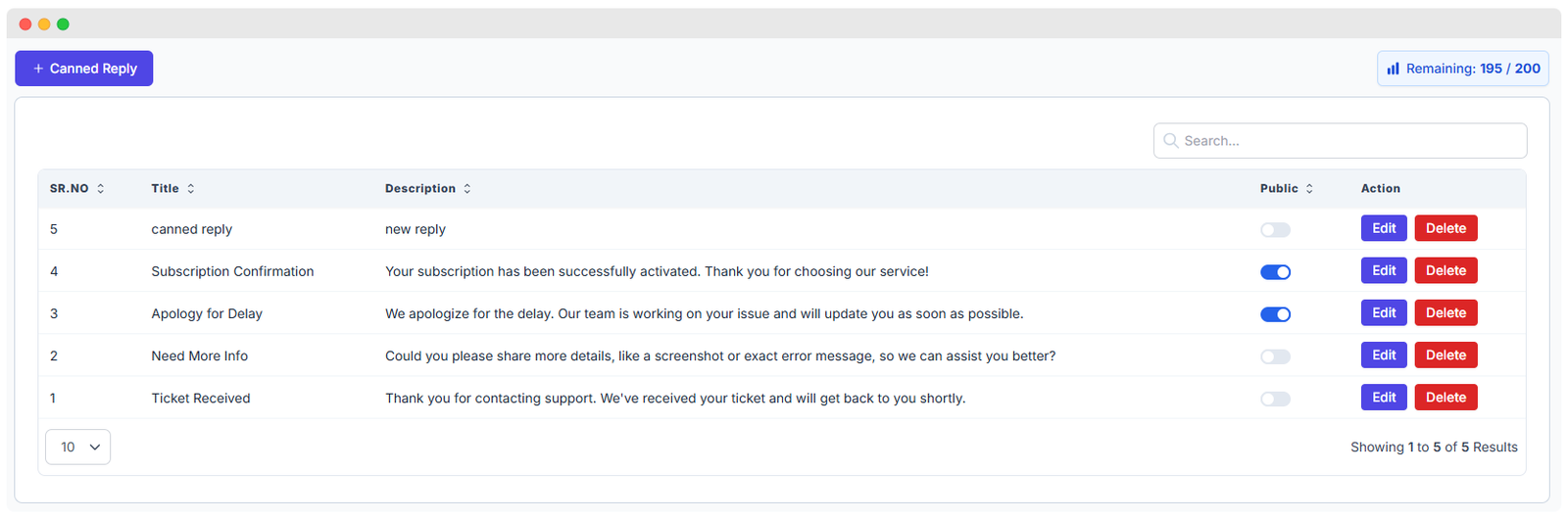
The Canned Reply list provides a comprehensive overview of all saved responses:
| Column | Description |
|---|---|
| SR. NO | Serial number for easy reference. |
| Title | A short, descriptive name of the reply for quick identification. |
| Description | The full content or message body of the canned reply that will be sent to the contact. |
| Public Toggle | A switch to make a canned reply Public (accessible by all authorized users) or Private |
| Action Buttons | Includes Edit (to update the title or description) and Delete (to permanently remove the reply). |
The management interface also includes several controls to help you navigate and manage your replies:
- Search Bar: Quickly find specific canned replies by searching with keywords in the title or description.
- Pagination Control: Allows you to select how many canned replies to display per page (e.g., 10, 25, 50).
- Remaining Quota Indicator: Shows your usage limit (e.g., "Remaining: 195 / 200") to help you manage available resources.
Adding a New Canned Reply
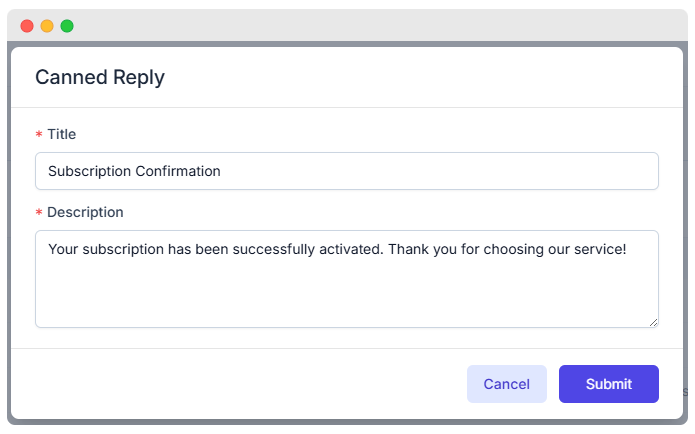
To create a new canned reply:
- Click the + Canned Reply button located at the top-left corner of the list page.
- In the pop-up form, enter the following details:
- Title: A concise name for the canned reply (e.g., "Subscription Confirmation").
- Description: The full message text that will be sent to customers.
- Click the Submit button to save the canned reply. Use the Cancel button to close the form without saving.
💡 Best Practice: Keep the title short and highly descriptive so your team can find the right reply quickly during a live chat.
Once saved, the reply will appear in the main list and can be immediately toggled as public/private.
How Canned Replies Are Used
Canned Replies are designed to be deployed instantly across your communication channels:
- WhatsApp Chats: Agents can quickly insert canned replies during live conversations directly from the chat interface, drastically improving response time.
- Customer Support: Handle frequently asked questions (FAQs) with professional, ready-made answers that ensure brand voice consistency.
- Lead Management: Send consistent follow-ups or initial greeting messages to potential customers.
- Common Use Cases: Greeting messages, subscription confirmations, apology notes, requests for additional information, and ticket acknowledgments.