Miscellaneous Settings
The Miscellaneous settings page allows you to manage general configurations for your application. This includes setting display preferences for data tables and defining default behaviors for WhatsApp template interactions.
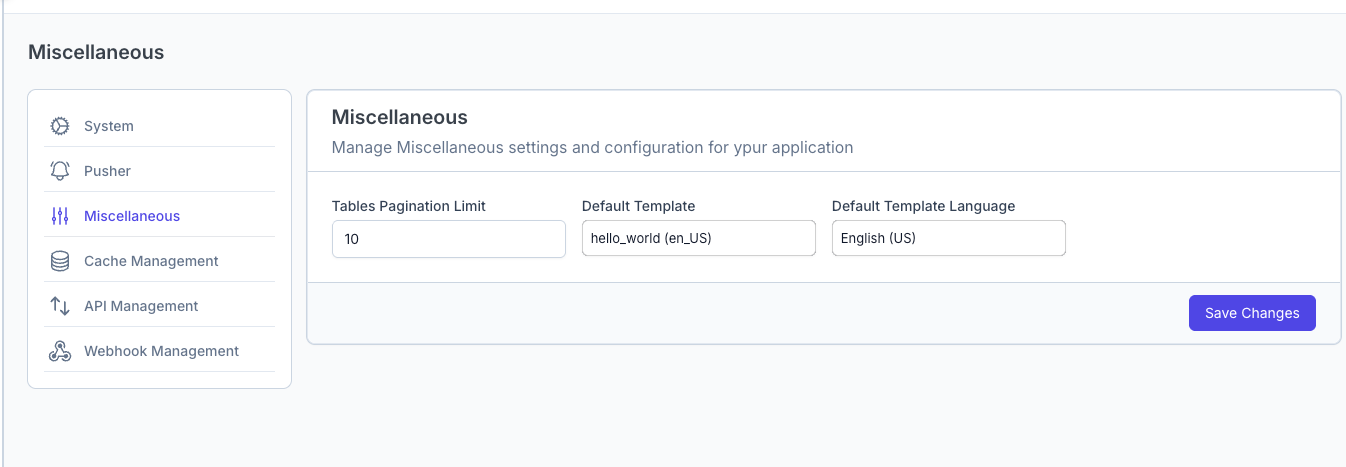
Configuration Options
This page contains three primary input forms to customize your tenant experience:
1. Tables Pagination Limit
- Purpose: Controls the default number of rows displayed on list pages (e.g., Contacts list, Campaign list, Logs).
- How it works: Enter a number (e.g.,
10,25,50). - Benefit: Allows you to adjust data density based on your screen size or preference. A higher limit shows more data at once but may load slightly slower.
- Default: Typically set to
10rows per page.
2. Default Template
- Purpose: Sets the specific WhatsApp message template that is pre-selected or automatically sent when you initiate a new chat with a contact.
- How it works: Select a valid, approved template from the dropdown list.
- Use Case: If you frequently start conversations with a standard "Hello" or "Welcome" message, setting it as default saves time by pre-loading it in the chat interface.
3. Default Template Language
- Purpose: Determines the default language version for your WhatsApp templates.
- How it works: Select a language (e.g.,
English (US),Arbic) from the dropdown menu. - Benefit: Ensures consistency across your communications. When creating new templates or campaigns, the system will default to this language selection, reducing the risk of sending messages in the wrong language.
Saving Changes
After adjusting these settings, ensure you click the Save button to apply the changes across your tenant account.