AI Integration
Boost your WhatsApp messaging/AI Assistant workflows with smart automation powered by OpenAI's GPT models. With WhatsCloud "AI Integration" settings
Prerequisites
- You must have an OpenAI API Key configured. Click here to learn how.
1. Access Application Settings
- Log in to your WhatsCloud tenant dashboard
- In the left sidebar, navigate to Settings section
- Click on Application Settings from the menu
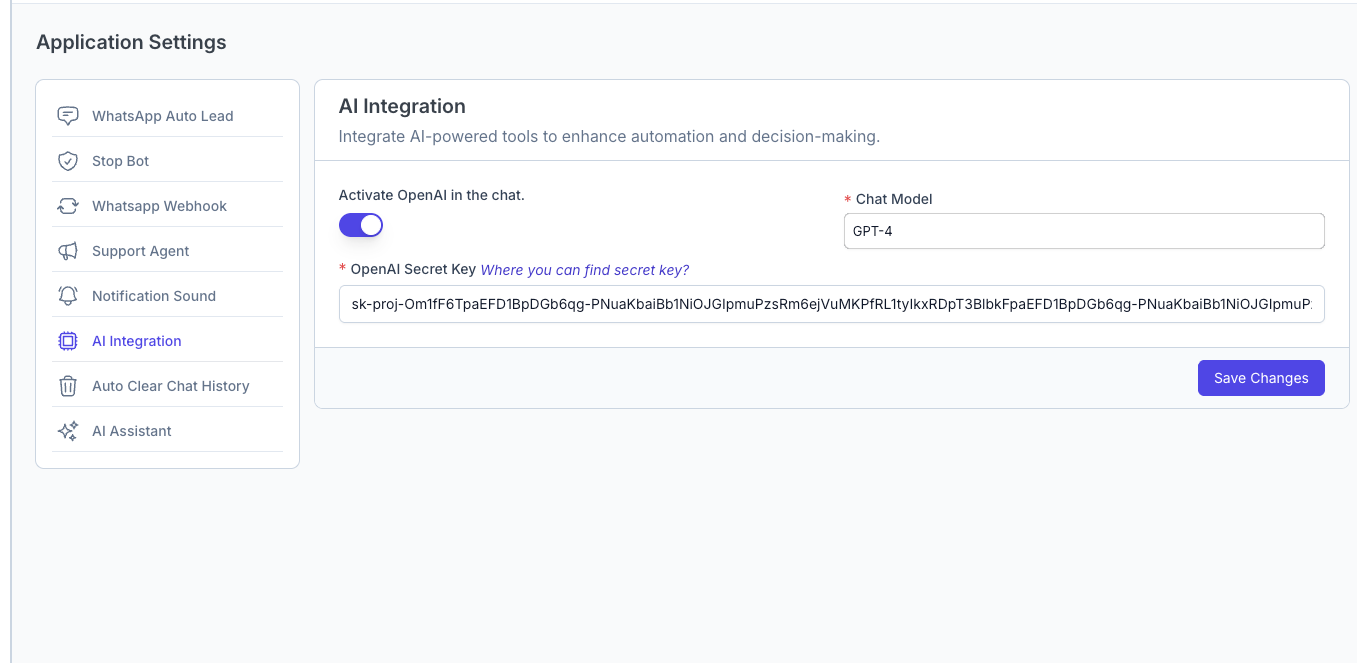
2. Configure AI Integration
- Activate OpenAI
- In the AI Integration section, you'll see the toggle for "Activate OpenAI in the chat"
- Turn on the toggle to enable OpenAI integration
- Select Chat Model
- From the Chat Model dropdown, select your preferred model:
- GPT-4o Mini (recommended for most use cases - Fast & cost-effective)
- GPT-4 (for advanced reasoning - higher cost)
- Other available models as per your OpenAI project settings
- From the Chat Model dropdown, select your preferred model:
- Enter OpenAI Secret Key
- In the OpenAI Secret Key field, paste your API key from Step 1
- Ensure there are no extra spaces or characters
- The key should start with "sk-" followed by your unique identifier
- Save Configuration
- Click the Save Changes button to apply your settings
- Verify that the configuration is saved successfully